linux_login_log
Linux 登录日志 美化工具
一键脚本
bash <(curl -sL gitee.com/meimolihan/linux-command_sh/raw/master/linux_login_log.sh)
效果预览
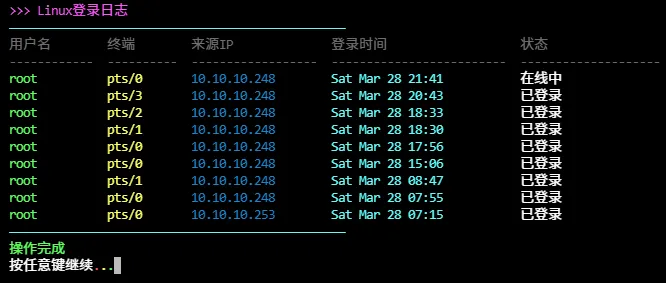
补充说明
该脚本是Linux登录日志美化工具,用于解析和美化系统登录日志(如 /var/log/wtmp),支持彩色输出、登录记录分析、异常检测等功能。
功能特点
- 基于 last 命令解析系统登录日志
- 彩色高亮显示登录状态(成功/失败)
- 显示最近N条登录记录(默认10条)
- 统计每个用户的登录次数
- 检测异常来源IP登录
- 支持交互式查看和筛选
- 输出格式清晰,包含用户名、终端、来源IP、登录时间、状态等字段
- 自动识别重启记录并标注
输出说明
脚本输出包含以下字段:
| 字段 | 说明 |
|---|---|
| 用户名 | 登录系统的用户名 |
| 终端 | 登录使用的终端(如 pts/0、tty1) |
| 来源IP | 登录来源IP地址(远程登录时显示) |
| 登录时间 | 登录发生的时间 |
| 状态 | 登录状态(成功、失败、重启等) |
| 统计信息 | 显示用户登录次数统计 |
| 异常提示 | 标注可疑或异常登录行为 |
注意事项
- 脚本依赖 last 命令,确保系统已安装 util-linux 包
- 需要读取 /var/log/wtmp 文件,可能需要相应权限
- 部分系统可能使用 /var/log/wtmp 或 /var/log/btmp 记录不同登录信息
- 彩色输出需要终端支持ANSI转义序列
- 默认显示最近10条记录,可调整参数修改数量
- 异常检测基于简单规则,复杂场景可能需要自定义
- 脚本以bash编写,确保运行环境支持bash
脚本源码
#!/bin/bash
set -uo pipefail

list_color_init() {
    export gl_hui=$'\033[38;5;59m'
    export gl_hong=$'\033[38;5;9m'
    export gl_lv=$'\033[38;5;10m'
    export gl_huang=$'\033[38;5;11m'
    export gl_lan=$'\033[38;5;32m'
    export gl_bai=$'\033[38;5;15m'
    export gl_zi=$'\033[38;5;13m'
    export gl_bufan=$'\033[38;5;14m'
    export reset=$'\033[0m'
}
list_color_init

break_end() {
    echo -e "${gl_lv}操作完成${gl_bai}"
    echo -e "${gl_bai}按任意键继续 ${gl_hong}.${gl_huang}.${gl_lv}.${gl_bai}\c"
    read -r -n 1 -s -r -p ""
    echo ""
    clear
}

column_if_available() {
    if command -v column &> /dev/null; then
        column -t -s $'\t'
    else
        cat
    fi
}

list_beautify_linux_login_log() {
    {
        printf "%s%-12s\t%-10s\t%-18s\t%-25s\t%-20s%s\n" \
            "$gl_hui" "用户名" "终端" "来源IP" "登录时间" "状态" "$reset"
        printf "%s%-12s\t%-10s\t%-18s\t%-25s\t%-20s%s\n" \
            "$gl_hui" "------------" "----------" "------------------" "-------------------------" "--------------------" "$reset"

        last -n 10 2>/dev/null | awk '
        NF >= 8 && $1 != "reboot" && $1 != "wtmp" {
            user = $1
            tty  = $2
            from = ($3 ~ /^[0-9]/ || $3 ~ /:/) ? $3 : "本地"
            time = $4" "$5" "$6" "$7
            stat = "已登录"
            if ($0 ~ /still logged in/) stat = "在线中"
            else if ($0 ~ /gone/) stat = "已退出"
            print user, tty, from, time, stat
        }' | awk -v green="$gl_lv" \
            -v yellow="$gl_huang" \
            -v blue="$gl_lan" \
            -v cyan="$gl_bufan" \
            -v purple="$gl_zi" \
            -v gray="$gl_hui" \
            -v white="$gl_bai" \
            -v reset="$reset" '
        BEGIN { FS=" "; OFS="\t" }
        {
            printf "%s%-12s%s\t", green,    $1, reset
            printf "%s%-10s%s\t", yellow,  $2, reset
            printf "%s%-18s%s\t", blue,    $3, reset
            printf "%s%-25s%s\t", cyan,    $4" "$5" "$6" "$7, reset
            printf "%s%-20s%s\n", white,   $8, reset
        }'
    } | column_if_available
}


list_beautify_all() {
    clear
    echo -e "${gl_zi}>>> Linux登录日志${gl_bai}"
    echo -e "${gl_bufan}————————————————————————————————————————————————${gl_bai}"
    list_beautify_linux_login_log
    echo -e "${gl_bufan}————————————————————————————————————————————————${gl_bai}"
    break_end
}

list_beautify_all
创建本地脚本
new_script="new_test.sh"

cat > "$new_script" << 'EOF'
#!/bin/bash

# 粘贴脚本源码

EOF

# 保留本地脚本,去掉 rm -f "$new_script"
chmod +x "$new_script" && ./"$new_script" && rm -f "$new_script"