linux_ls_beautify
ls 配色美化工具
一键脚本
bash <(curl -sL gitee.com/meimolihan/linux-command_sh/raw/master/linux_ls_beautify.sh)
效果预览
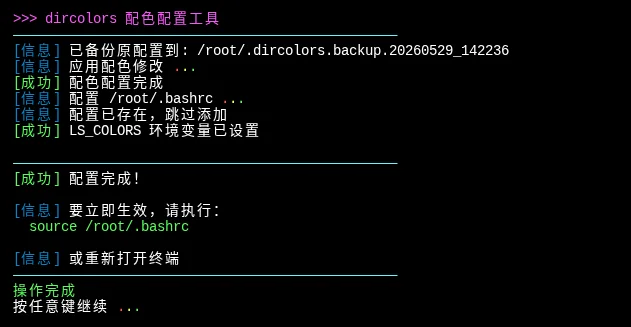
补充说明
该脚本用于配置 dircolors 配色方案,美化 ls 命令的输出颜色,让目录、可执行文件、压缩包、媒体文件等不同类型使用不同的颜色显示,提升终端使用体验。
功能特点
- 自动安装依赖:未检测到 dircolors 时自动跨发行版安装 coreutils
- 配色配置:生成
~/.dircolors配置文件,区分目录、可执行文件、链接、压缩包、媒体文件、脚本文件 - Shell 配置:自动检测当前 Shell(bash/zsh/fish/ksh)并在配置文件中添加 dircolors 加载和 ls 别名
- 备份原配置:修改前自动备份已有 dircolors 配置
- 即时代效:配置完成后设置 LS_COLORS 环境变量
配色方案
| 文件类型 | 颜色 | ANSI 代码 |
|---|---|---|
| 目录 | 蓝色高亮 | 01;34 |
| 可执行文件 | 绿色高亮 | 01;32 |
| 符号链接 | 紫色高亮 | 01;35 |
| 压缩文件 (.tar/.gz/.zip 等) | 红色高亮 | 01;31 |
| 图片文件 (.jpg/.png/.gif) | 紫色高亮 | 01;35 |
| 音频视频 (.mp3/.mp4) | 青色高亮 | 01;36 |
| 脚本文件 (.sh/.py/.js) | 绿色高亮 | 01;32 |
| socket/pipe 文件 | 黄色高亮 | 01;33 |
注意事项
- 配置写入后需要
source ~/.bashrc(或其他 shell 配置文件)或重新打开终端才能生效 - 脚本会自动检测当前使用的 Shell 并修改对应的配置文件
- 如已存在
~/.dircolors文件,会自动备份再修改 - 如果系统未安装 coreutils,会自动尝试安装
- 配置了
ll、la、l等便捷别名
创建测试文件
# 一键复制粘贴执行所有测试文件创建(在 /tmp 目录下,保留 ls 输出)
cd /tmp && rm -rf /tmp/ls_test && mkdir -p /tmp/ls_test && cd /tmp/ls_test && \
mkdir -p {Documents,Downloads,Projects,Images,Videos,Music,.hidden_dir,Backup} && \
touch file.tar file.tgz file.gz file.bz2 file.xz file.7z file.rar file.zip && \
touch image.jpg image.jpeg image.png image.gif image.bmp image.svg && \
touch audio.mp3 audio.wav audio.flac audio.ogg && \
touch video.mp4 video.avi video.mkv video.mov && \
touch document.pdf document.doc document.docx document.odt && \
touch sheet.xls sheet.xlsx && \
touch slide.ppt slide.pptx && \
touch script.sh script.bash script.py script.pl script.rb && \
touch code.js code.ts code.html code.css code.json code.xml && \
touch config.yaml config.yml && \
touch program.go program.rs program.c program.cpp main.java && \
touch settings.conf app.config system.ini server.cfg && \
touch README.txt notes.txt example.txt && \
touch run.sh deploy.sh backup.sh && \
chmod +x run.sh deploy.sh backup.sh && \
echo "Hello World" > hello.txt && \
echo '#!/bin/bash\necho "Hello Bash"' > test.sh && chmod +x test.sh && \
echo 'print("Hello Python")' > test.py && \
ln -s hello.txt link_hello.txt && \
ln -s test.sh link_script.sh && \
ln -s Documents link_documents && \
echo "" && \
echo "✅ 测试文件创建完成!当前目录: $(pwd)" && \
echo "" && \
ls --color=auto
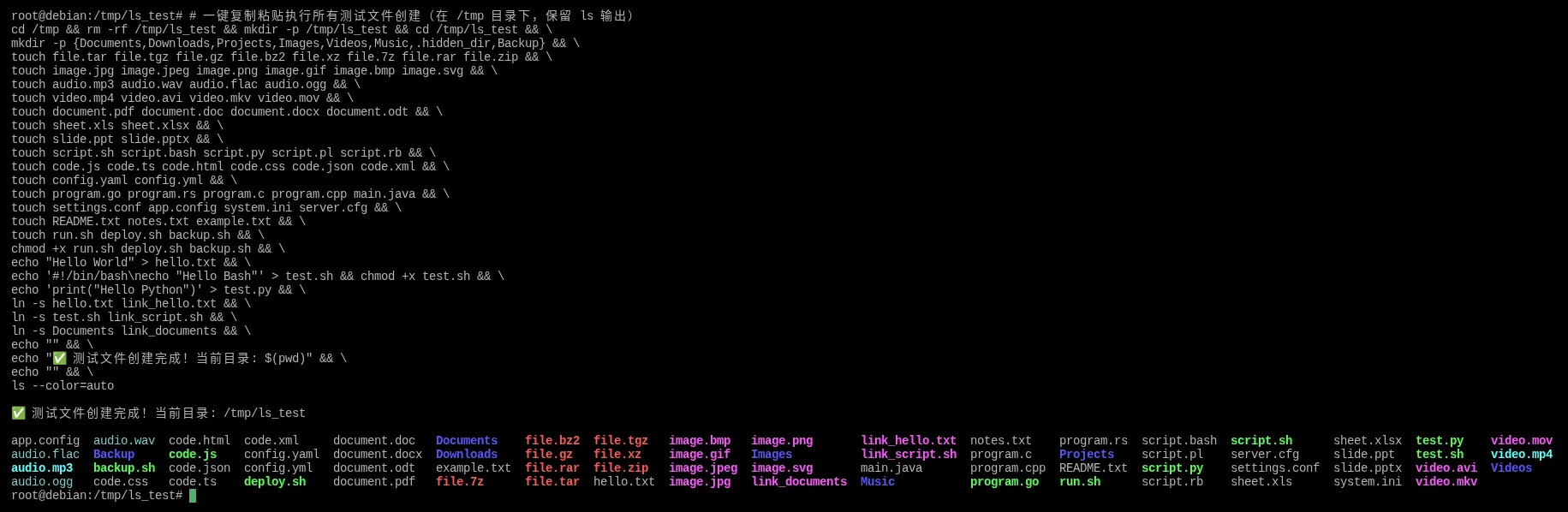
脚本源码
#!/bin/bash

list_color_init() {
    export gl_hui=$'\033[38;5;59m'
    export gl_hong=$'\033[38;5;9m'
    export gl_lv=$'\033[38;5;10m'
    export gl_huang=$'\033[38;5;11m'
    export gl_lan=$'\033[38;5;32m'
    export gl_bai=$'\033[38;5;15m'
    export gl_zi=$'\033[38;5;13m'
    export gl_bufan=$'\033[38;5;14m'
    export reset=$'\033[0m'
}
list_color_init

log_info()  { echo -e "${gl_lan}[信息]${gl_bai} $*"; }
log_ok()    { echo -e "${gl_lv}[成功]${gl_bai} $*"; }
log_warn()  { echo -e "${gl_huang}[警告]${gl_bai} $*"; }
log_error() { echo -e "${gl_hong}[错误]${gl_bai} $*" >&2; }

break_end() {
    echo -e "${gl_lv}操作完成${gl_bai}"
    echo -e "${gl_bai}按任意键继续 ${gl_hong}.${gl_huang}.${gl_lv}.${gl_bai} \c"
    read -r -n 1 -s -r -p ""
    echo ""
    clear
}

sleep_fractional() {
    local seconds=$1
    if sleep "$seconds" 2>/dev/null; then return 0; fi
    if command -v perl >/dev/null 2>&1; then perl -e "select(undef, undef, undef, $seconds)"; return 0; fi
    if command -v python3 >/dev/null 2>&1; then python3 -c "import time; time.sleep($seconds)"; return 0; fi
    if command -v python >/dev/null 2>&1; then python -c "import time; time.sleep($seconds)"; return 0; fi
    local int_seconds=$(echo "$seconds" | awk '{print int($1+0.999)}')
    sleep "$int_seconds"
}

detect_distro() {
    if [ -f /etc/os-release ]; then
        . /etc/os-release
        echo "$ID"
    elif [ -f /etc/redhat-release ]; then
        echo "rhel"
    elif [ -f /etc/debian_version ]; then
        echo "debian"
    else
        echo "unknown"
    fi
}

detect_shell_config() {
    local shell_name=$(basename "$SHELL")
    case $shell_name in
        bash) echo "$HOME/.bashrc" ;;
        zsh) echo "$HOME/.zshrc" ;;
        fish) echo "$HOME/.config/fish/config.fish" ;;
        ksh) echo "$HOME/.kshrc" ;;
        *) echo "$HOME/.profile" ;;
    esac
}

install_coreutils_if_needed() {
    if command -v dircolors >/dev/null 2>&1; then
        return 0
    fi

    log_warn "dircolors 命令未找到,尝试安装 coreutils ${gl_hong}.${gl_huang}.${gl_lv}.${gl_bai}"
    local distro=$(detect_distro)

    case $distro in
        debian|ubuntu|linuxmint)
            sudo apt-get update && sudo apt-get install -y coreutils
            ;;
        rhel|centos|fedora|rocky|almalinux)
            if command -v dnf >/dev/null 2>&1; then
                sudo dnf install -y coreutils
            else
                sudo yum install -y coreutils
            fi
            ;;
        arch|manjaro)
            sudo pacman -S --noconfirm coreutils
            ;;
        opensuse|suse)
            sudo zypper install -y coreutils
            ;;
        alpine)
            sudo apk add coreutils
            ;;
        *)
            log_error "无法自动安装,请手动安装 coreutils 包"
            return 1
            ;;
    esac

    if ! command -v dircolors >/dev/null 2>&1; then
        log_error "安装失败"
        return 1
    fi

    log_ok "coreutils 安装成功"
    return 0
}

configure_dircolors() {
    local dircolors_file="$HOME/.dircolors"

    if [ -f "$dircolors_file" ]; then
        local backup_file="${dircolors_file}.backup.$(date +%Y%m%d_%H%M%S)"
        cp "$dircolors_file" "$backup_file"
        log_info "已备份原配置到: $backup_file"
    else
        log_info "生成默认 dircolors 配置 ${gl_hong}.${gl_huang}.${gl_lv}.${gl_bai}"
        dircolors -p 2>/dev/null > "$dircolors_file" || {
            log_warn "使用备用配置模板 ${gl_hong}.${gl_huang}.${gl_lv}.${gl_bai}"
            cat > "$dircolors_file" << 'EOF'
NORMAL 00
FILE 00
DIR 01;34
LINK 01;36
FIFO 40;33
SOCK 01;35
DOOR 01;35
BLK 40;33;01
CHR 40;33;01
ORPHAN 40;31;01
MISSING 00
EXEC 01;32
EOF
        }
    fi

    log_info "应用配色修改 ${gl_hong}.${gl_huang}.${gl_lv}.${gl_bai}"
    local temp_file=$(mktemp)

    awk '
    BEGIN { updated=0 }
    /^DIR[[:space:]]/ { print "DIR 01;34"; updated=1; next }
    /^EXEC[[:space:]]/ { print "EXEC 01;32"; updated=1; next }
    /^LINK[[:space:]]/ { print "LINK 01;35"; updated=1; next }
    /^SOCK[[:space:]]/ { print "SOCK 01;33"; updated=1; next }
    /^FIFO[[:space:]]/ { print "FIFO 01;33"; updated=1; next }
    { print }
    END {
        if (!updated) {
            print "# 基本配置"
            print "DIR 01;34"
            print "EXEC 01;32"
            print "LINK 01;35"
            print "SOCK 01;33"
            print "FIFO 01;33"
        }
    }
    ' "$dircolors_file" > "$temp_file"

    cat >> "$temp_file" << 'EOF'

# 压缩文件
.tar 01;31
.tgz 01;31
.gz 01;31
.bz2 01;31
.xz 01;31
.7z 01;31
.rar 01;31
.zip 01;31

# 媒体文件
.jpg 01;35
.png 01;35
.gif 01;35
.mp3 01;36
.mp4 01;36

# 脚本文件
.sh 01;32
.py 01;32
.js 01;32
.go 01;32
EOF

    mv "$temp_file" "$dircolors_file"
    log_ok "配色配置完成"
}

configure_shell() {
    local shell_config=$(detect_shell_config)
    log_info "配置 $shell_config ${gl_hong}.${gl_huang}.${gl_lv}.${gl_bai}"

    local config_block="
# dircolors 配色配置
if [ -f \"\$HOME/.dircolors\" ] && command -v dircolors >/dev/null 2>&1; then
    eval \"\$(dircolors -b \"\$HOME/.dircolors\" 2>/dev/null)\"
fi
alias ls='ls --color=auto'
alias ll='ls -lh --group-directories-first'
alias la='ls -A'
alias l='ls -CF'
"

    if ! grep -q "dircolors 配色配置" "$shell_config" 2>/dev/null; then
        echo "$config_block" >> "$shell_config"
        log_ok "已添加配置到 $shell_config"
    else
        log_info "配置已存在,跳过添加"
    fi
}

apply_config() {
    local dircolors_file="$HOME/.dircolors"

    if command -v dircolors >/dev/null 2>&1 && [ -f "$dircolors_file" ]; then
        eval "$(dircolors -b "$dircolors_file" 2>/dev/null)" 2>/dev/null || true
        log_ok "LS_COLORS 环境变量已设置"
    fi
}

show_completion() {
    local shell_config=$(detect_shell_config)

    echo ""
    echo -e "${gl_bufan}————————————————————————————————————————————————${gl_bai}"
    log_ok "配置完成!"
    echo ""
    log_info "要立即生效,请执行:"
    echo -e "  ${gl_lv}source $shell_config${gl_bai}"
    echo ""
    log_info "或重新打开终端"
    echo -e "${gl_bufan}————————————————————————————————————————————————${gl_bai}"
}

main() {
    clear
    echo -e "${gl_zi}>>> dircolors 配色配置工具${gl_bai}"
    echo -e "${gl_bufan}————————————————————————————————————————————————${gl_bai}"

    if install_coreutils_if_needed; then
        configure_dircolors
        configure_shell
        apply_config
        show_completion
    else
        log_error "配置失败,请检查系统环境"
        exit 1
    fi

    break_end
}

if [[ "${BASH_SOURCE[0]}" == "${0}" ]]; then
    main
fi
创建本地脚本
new_script="linux_ls_beautify.sh"

cat > "$new_script" << 'EOF'
#!/bin/bash

# 粘贴脚本源码

EOF

chmod +x "$new_script" && ./"$new_script" && rm -f "$new_script"