linux_lscpu
CPU 架构列表 美化工具
一键脚本
bash <(curl -sL gitee.com/meimolihan/linux-command_sh/raw/master/linux_lscpu.sh)
总结
- 无任何参数,直接运行即可
- 自动解析
lscpu并输出美观易读的 CPU 详情 - 支持中英文系统自动识别
效果预览
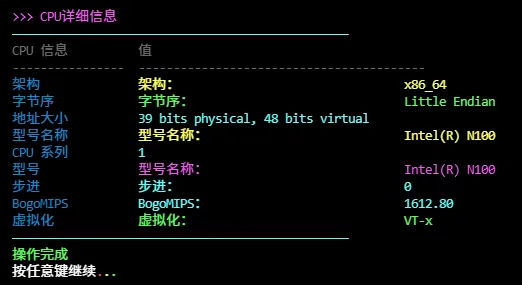
补充说明
该脚本用于美化显示 CPU 架构信息,基于 lscpu 命令实现,适合快速查看 CPU 型号、核心数、架构等信息的场景。
功能特点
- 彩色输出:字段名(青色)、值(绿色)使用不同颜色区分
- 完整信息:显示架构、CPU 型号、核心数、线程数、缓存等完整信息
- 表格格式化:自动使用
column命令对齐输出 - 排序显示:按字段重要性排序,便于查找关键信息
输出说明
脚本输出包含以下信息:
| 字段 | 说明 |
|---|---|
| Architecture | CPU 架构(如 x86_64、aarch64) |
| Model name | CPU 型号名称 |
| CPU(s) | CPU 核心总数(含超线程) |
| Thread(s) per core | 每核心线程数 |
| Core(s) per socket | 每插槽核心数 |
| Socket(s) | CPU 插槽数 |
| CPU MHz | CPU 主频 |
| Cache | L1/L2/L3 缓存大小 |
注意事项
- 需要系统已安装
lscpu命令(通常系统自带) - 需要
column命令(通常系统已自带) - 虚拟机中可能显示虚拟 CPU 信息
- 物理机可查看真实的 CPU 详细信息
脚本源码
#!/bin/bash
set -uo pipefail

list_color_init() {
    export gl_hui=$'\033[38;5;59m'
    export gl_hong=$'\033[38;5;9m'
    export gl_lv=$'\033[38;5;10m'
    export gl_huang=$'\033[38;5;11m'
    export gl_lan=$'\033[38;5;32m'
    export gl_bai=$'\033[38;5;15m'
    export gl_zi=$'\033[38;5;13m'
    export gl_bufan=$'\033[38;5;14m'
    export reset=$'\033[0m'
}
list_color_init

break_end() {
    echo -e "${gl_lv}操作完成${gl_bai}"
    echo -e "${gl_bai}按任意键继续 ${gl_hong}.${gl_huang}.${gl_lv}.${gl_bai}\c"
    read -r -n 1 -s -r -p ""
    echo ""
    clear
}

column_if_available() {
    if command -v column &> /dev/null; then
        column -t -s $'\t'
    else
        cat
    fi
}

list_beautify_linux_lscpu() {
    {
        lscpu_output=$(lscpu)

        extract_value() {
            local key="$1"
            echo "$lscpu_output" | grep -i "$key" | sed 's/^[^:]*:[[:space:]]*//' | head -1
        }

        architecture=$(extract_value "架构\|Architecture")
        cpu_op_modes=$(extract_value "CPU 操作模式\|CPU op-mode")
        byte_order=$(extract_value "字节序\|Byte Order")
        address_sizes=$(extract_value "地址大小\|Address sizes")
        vendor_id=$(extract_value "Vendor ID\|制造厂商")
        model_name=$(extract_value "型号名称\|Model name")
        cpu_family=$(extract_value "CPU 系列\|CPU family")
        model=$(extract_value "型号\|Model")
        stepping=$(extract_value "步进\|Stepping")
        cpu_mhz=$(extract_value "CPU MHz")
        cpu_max_mhz=$(extract_value "CPU max MHz")
        cpu_min_mhz=$(extract_value "CPU min MHz")
        bogomips=$(extract_value "BogoMIPS")
        l1d_cache=$(extract_value "L1d cache")
        l1i_cache=$(extract_value "L1i cache")
        l2_cache=$(extract_value "L2 cache")
        l3_cache=$(extract_value "L3 cache")
        sockets=$(extract_value "Socket(s)")
        cores_per_socket=$(extract_value "Core(s) per socket")
        threads_per_core=$(extract_value "Thread(s) per core")
        cpu_total=$(extract_value "^CPU(s):")
        virtualization=$(extract_value "Virtualization\|虚拟化")
        numa_nodes=$(extract_value "NUMA node(s)")

        show_row() {
            local label="$1"
            local value="$2"
            local value_color="$3"

            if [ -n "$value" ]; then
                printf "%s%s\t%s%s%s\n" "$gl_lan" "$label" "$reset" "$value_color" "$value"
            fi
        }

        printf "%s%s\t%s%s\n" "$gl_hui" "CPU 信息" "值" "$reset"
        printf "%s%s\t%s%s\n" "$gl_hui" "----------------" "-----------------------------------------" "$reset"
        printf "\n"

        show_row "架构" "$architecture" "$gl_huang"
        show_row "CPU 操作模式" "$cpu_op_modes" "$gl_bufan"
        show_row "字节序" "$byte_order" "$gl_lv"
        show_row "地址大小" "$address_sizes" "$gl_bufan"

        printf "\n"

        show_row "制造商" "$vendor_id" "$gl_lv"
        show_row "型号名称" "$model_name" "$gl_huang"
        show_row "CPU 系列" "$cpu_family" "$gl_bufan"
        show_row "型号" "$model" "$gl_zi"
        show_row "步进" "$stepping" "$gl_bufan"

        printf "\n"

        if [ -n "$cpu_mhz" ]; then
            show_row "CPU 频率" "${cpu_mhz} MHz" "$gl_hong"
        fi
        if [ -n "$cpu_max_mhz" ]; then
            show_row "最大频率" "${cpu_max_mhz} MHz" "$gl_huang"
        fi
        if [ -n "$cpu_min_mhz" ]; then
            show_row "最小频率" "${cpu_min_mhz} MHz" "$gl_lv"
        fi
        if [ -n "$bogomips" ]; then
            show_row "BogoMIPS" "$bogomips" "$gl_bufan"
        fi

        printf "\n"

        if [ -n "$l1d_cache" ]; then
            show_row "L1d 缓存" "$l1d_cache" "$gl_bufan"
        fi
        if [ -n "$l1i_cache" ]; then
            show_row "L1i 缓存" "$l1i_cache" "$gl_bufan"
        fi
        if [ -n "$l2_cache" ]; then
            show_row "L2 缓存" "$l2_cache" "$gl_huang"
        fi
        if [ -n "$l3_cache" ]; then
            show_row "L3 缓存" "$l3_cache" "$gl_zi"
        fi

        printf "\n"

        if [ -n "$cpu_total" ]; then
            show_row "逻辑处理器数" "$cpu_total" "$gl_hong"
        fi
        if [ -n "$sockets" ] && [ -n "$cores_per_socket" ]; then
            total_cores=$((sockets * cores_per_socket))
            show_row "物理核心数" "$total_cores" "$gl_huang"
        fi
        if [ -n "$sockets" ]; then
            show_row "插槽数" "$sockets" "$gl_bufan"
        fi
        if [ -n "$cores_per_socket" ]; then
            show_row "每插槽核心数" "$cores_per_socket" "$gl_huang"
        fi
        if [ -n "$threads_per_core" ]; then
            show_row "每核心线程数" "$threads_per_core" "$gl_lv"
        fi

        printf "\n"

        if [ -n "$virtualization" ]; then
            show_row "虚拟化" "$virtualization" "$gl_lv"
        fi
        if [ -n "$numa_nodes" ]; then
            show_row "NUMA 节点数" "$numa_nodes" "$gl_huang"
        fi

    } | column_if_available
}

list_beautify_all() {
    clear
    echo -e "${gl_zi}>>> CPU详细信息${gl_bai}"
    echo -e "${gl_bufan}————————————————————————————————————————————————${gl_bai}"
    list_beautify_linux_lscpu

    echo -e "${gl_bufan}————————————————————————————————————————————————${gl_bai}"
    break_end
}

list_beautify_all
创建本地脚本
new_script="new_test.sh"

cat > "$new_script" << 'EOF'
#!/bin/bash

# 粘贴脚本源码

EOF

# 保留本地脚本,去掉 rm -f "$new_script"
chmod +x "$new_script" && ./"$new_script" && rm -f "$new_script"