linux_lspci
【Linux系统PCI设备列表】美化脚本
一键脚本
bash <(curl -sL gitee.com/meimolihan/linux-command_sh/raw/master/linux_lspci.sh)
效果预览
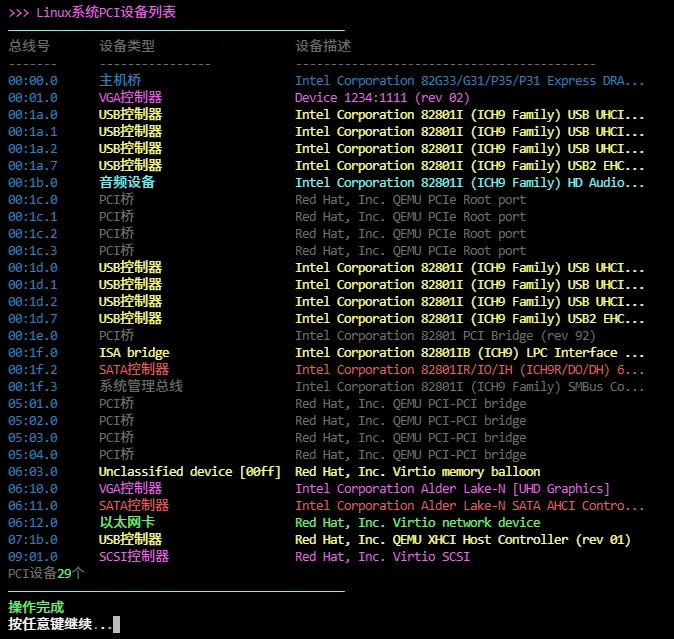
脚本源码
#!/bin/bash

list_color_init() {
    export gl_hui=$'\033[38;5;59m'
    export gl_hong=$'\033[38;5;9m'
    export gl_lv=$'\033[38;5;10m'
    export gl_huang=$'\033[38;5;11m'
    export gl_lan=$'\033[38;5;32m'
    export gl_bai=$'\033[38;5;15m'
    export gl_zi=$'\033[38;5;13m'
    export gl_bufan=$'\033[38;5;14m'
    export reset=$'\033[0m'
}
list_color_init

break_end() {
    echo -e "${gl_lv}操作完成${gl_bai}"
    echo -e "${gl_bai}按任意键继续${gl_hong}.${gl_huang}.${gl_lv}.${gl_bai}\c"
    read -r -n 1 -s -r -p ""
    echo ""
    clear
}

column_if_available() {
    if command -v column &> /dev/null; then
        column -t -s $'\t'
    else
        cat
    fi
}

list_beautify_linux_lspci() {
    {
        printf "%s%s\t%s\t%s%s\n" "$gl_hui" "总线号" "设备类型" "设备描述" "$reset"
        printf "%s%s\t%s\t%s%s\n" "$gl_hui" "-------" "----------------" "-------------------------------------------" "$reset"

        data=$(lspci 2>/dev/null)

        if [ -z "$data" ]; then
            printf "%s%s\t%s\t%s%s\n" "$gl_hong" "(错误)" "(错误)" "无法执行 lspci 命令" "$reset"
        else
            total_devices=$(echo "$data" | wc -l)

            echo "$data" | while IFS= read -r line; do
                bus_id=$(echo "$line" | cut -d' ' -f1)
                device_desc=$(echo "$line" | cut -d' ' -f2-)

                device_type=$(echo "$device_desc" | cut -d: -f1)
                device_detail=$(echo "$device_desc" | cut -d: -f2- | sed 's/^ //')

                if [ -z "$device_detail" ]; then
                    device_detail="$device_desc"
                    device_type="未知"
                fi

                case "$device_type" in
                    "Host bridge"|"主机桥")
                        type_color=$gl_lan
                        type_display="${type_color}主机桥$reset"
                        ;;
                    "VGA compatible controller"|"VGA兼容控制器")
                        type_color=$gl_zi
                        type_display="${type_color}VGA控制器$reset"
                        ;;
                    "Ethernet controller"|"以太网控制器")
                        type_color=$gl_lv
                        type_display="${type_color}以太网卡$reset"
                        ;;
                    "Network controller"|"网络控制器")
                        type_color=$gl_bufan
                        type_display="${type_color}网络控制器$reset"
                        ;;
                    "USB controller"|"USB控制器")
                        type_color=$gl_huang
                        type_display="${type_color}USB控制器$reset"
                        ;;
                    "SATA controller"|"SATA控制器")
                        type_color=$gl_hong
                        type_display="${type_color}SATA控制器$reset"
                        ;;
                    "Audio device"|"音频设备")
                        type_color=$gl_bufan
                        type_display="${type_color}音频设备$reset"
                        ;;
                    "PCI bridge"|"PCI桥")
                        type_color=$gl_hui
                        type_display="${type_color}PCI桥$reset"
                        ;;
                    "Non-Volatile memory controller"|"非易失性内存控制器")
                        type_color=$gl_hong
                        type_display="${type_color}NVMe控制器$reset"
                        ;;
                    "SCSI storage controller"|"SCSI存储控制器")
                        type_color=$gl_zi
                        type_display="${type_color}SCSI控制器$reset"
                        ;;
                    "SMBus"|"系统管理总线")
                        type_color=$gl_hui
                        type_display="${type_color}系统管理总线$reset"
                        ;;
                    "Communication controller"|"通信控制器")
                        type_color=$gl_bufan
                        type_display="${type_color}通信控制器$reset"
                        ;;
                    *)
                        type_color=$gl_huang
                        type_display="${type_color}$device_type$reset"
                        ;;
                esac

                if [ ${#device_detail} -gt 50 ]; then
                    device_detail="${device_detail:0:47}..."
                fi

                printf "%s%s%s\t%s\t%s%s%s\n" \
                    "$gl_lan" "$bus_id" "$reset" \
                    "$type_display" \
                    "$type_color" "$device_detail" "$reset"
            done

            printf "\n"
            printf "%sPCI设备%s%s%s个%s\n" "$gl_hui" "$gl_lv" "$total_devices" "$gl_hui" "$reset"
        fi

    } | column_if_available
}

list_beautify_all() {
    clear
    echo -e "${gl_zi}>>> Linux系统PCI设备列表${gl_bai}"
    echo -e "${gl_bufan}————————————————————————————————————————————————${gl_bai}"
    list_beautify_linux_lspci
    echo -e "${gl_bufan}————————————————————————————————————————————————${gl_bai}"
    break_end
}

list_beautify_all
创建本地脚本
new_script="new_test.sh"

cat > "$new_script" << 'EOF'
#!/bin/bash

# 粘贴脚本源码

EOF

# 保留本地脚本,去掉 rm -f "$new_script"
chmod +x "$new_script" && ./"$new_script" && rm -f "$new_script"