linux_port
Linux 端口占用列表 美化工具
一键脚本
bash <(curl -sL gitee.com/meimolihan/linux-command_sh/raw/master/linux_port.sh)
效果预览
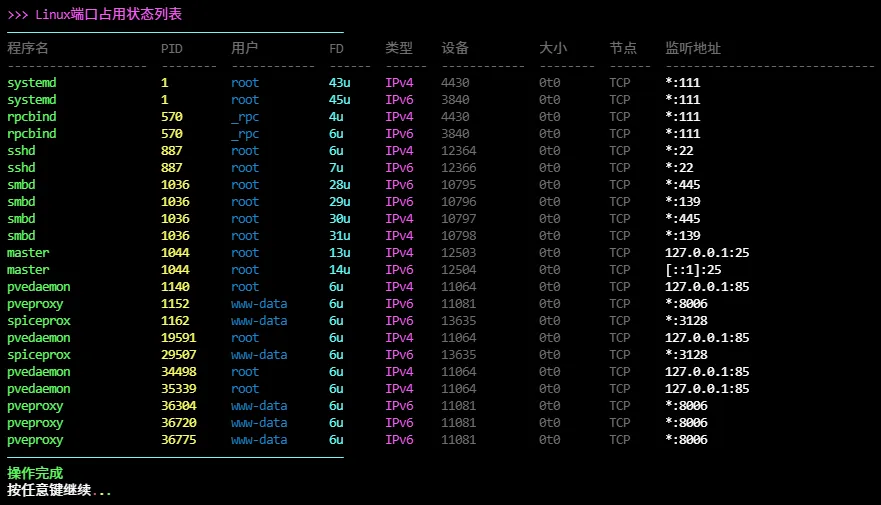
补充说明
该脚本是Linux端口占用列表美化工具,基于 lsof 命令解析系统端口监听情况,以彩色格式化输出。
功能特点
- 基于 lsof -i -P -n 命令解析端口占用
- 彩色高亮显示监听状态的端口
- 显示程序名、PID、用户、文件描述符、套接字类型、设备、大小、节点、监听地址等详细信息
- 自动去重,避免重复显示相同记录
- 格式化输出,对齐清晰
- 仅显示 LISTEN 状态的端口
- 支持管道处理,过滤和排序更灵活
输出说明
脚本输出包含以下字段:
| 字段 | 说明 |
|---|---|
| 程序名 | 占用端口的进程名称 |
| PID | 进程ID |
| 用户 | 进程运行的用户 |
| FD | 文件描述符 |
| 类型 | 套接字类型(IPv4、IPv6、TCP、UDP等) |
| 设备 | 网络设备信息 |
| 大小 | 相关大小信息 |
| 节点 | inode 节点号 |
| 监听地址 | 监听的IP地址和端口号 |
注意事项
- 脚本依赖 lsof 命令,确保系统已安装 lsof 包
- 查看所有端口需要足够权限(通常需要 root)
- 普通用户只能看到自己的进程端口占用
- 彩色输出需要终端支持 ANSI 转义序列
- 仅显示处于 LISTEN 状态的端口,不显示已建立的连接
- 脚本以 bash 编写,确保运行环境支持 bash
- lsof 输出格式可能因版本不同略有差异
- 脚本会自动去重,避免同一端口多次显示
脚本源码
#!/bin/bash
set -uo pipefail

list_color_init() {
    export gl_hui=$'\033[38;5;59m'
    export gl_hong=$'\033[38;5;9m'
    export gl_lv=$'\033[38;5;10m'
    export gl_huang=$'\033[38;5;11m'
    export gl_lan=$'\033[38;5;32m'
    export gl_bai=$'\033[38;5;15m'
    export gl_zi=$'\033[38;5;13m'
    export gl_bufan=$'\033[38;5;14m'
    export reset=$'\033[0m'
}
list_color_init

break_end() {
    echo -e "${gl_lv}操作完成${gl_bai}"
    echo -e "${gl_bai}按任意键继续 ${gl_hong}.${gl_huang}.${gl_lv}.${gl_bai}\c"
    read -r -n 1 -s -r -p ""
    echo ""
    clear
}

column_if_available() {
    if command -v column &> /dev/null; then
        column -t -s $'\t'
    else
        cat
    fi
}

list_beautify_linux_port() {
    {
        printf "%s%-20s\t%-8s\t%-12s\t%-6s\t%-6s\t%-12s\t%-8s\t%-6s\t%-30s%s\n" \
            "$gl_hui" "程序名" "PID" "用户" "FD" "类型" "设备" "大小" "节点" "监听地址" "$reset"
        printf "%s%-20s\t%-8s\t%-12s\t%-6s\t%-6s\t%-12s\t%-8s\t%-6s\t%-30s%s\n" \
            "$gl_hui" "--------------------" "--------" "------------" "------" "------" "------------" "--------" "------" "------------------------------" "$reset"

        lsof -i -P -n 2>/dev/null | awk '
        /LISTEN/ && !seen[$0]++ {
            command = $1
            pid = $2
            user = $3
            fd = $4
            type = $5
            device = $6
            size = $7
            node = $8
            name = substr($0, index($0, $9))
            print command, pid, user, fd, type, device, size, node, name
        }' | awk -v green="$gl_lv" -v yellow="$gl_huang" -v blue="$gl_lan" -v cyan="$gl_bufan" \
            -v purple="$gl_zi" -v gray="$gl_hui" -v white="$gl_bai" -v reset="$reset" '
        BEGIN {FS=" "; OFS="\t"}
        {
            print green $1 reset,
                  yellow $2 reset,
                  blue $3 reset,
                  cyan $4 reset,
                  purple $5 reset,
                  gray $6 reset,
                  gray $7 reset,
                  gray $8 reset,
                  white $9 reset
        }'
    } | column_if_available
}

list_beautify_all() {
    clear
    echo -e "${gl_zi}>>> Linux端口占用状态列表${gl_bai}"
    echo -e "${gl_bufan}————————————————————————————————————————————————${gl_bai}"
    list_beautify_linux_port
    echo -e "${gl_bufan}————————————————————————————————————————————————${gl_bai}"
    break_end
}

list_beautify_all
创建本地脚本
new_script="new_test.sh"

cat > "$new_script" << 'EOF'
#!/bin/bash

# 粘贴脚本源码

EOF

# 保留本地脚本,去掉 rm -f "$new_script"
chmod +x "$new_script" && ./"$new_script" && rm -f "$new_script"