linux_swap
Linux 内存/交换分区列表 美化工具
一键脚本
bash <(curl -sL gitee.com/meimolihan/linux-command_sh/raw/master/linux_swap.sh)
效果预览
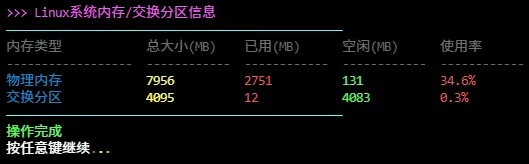
补充说明
美化显示Linux系统物理内存和交换分区(Swap)的使用情况,适用于快速查看系统内存状态的场景。
功能特点
- 同时显示物理内存和交换分区的使用情况
- 自动计算并显示内存使用率(已用/总计)
- 使用不同颜色区分总大小、已用、空闲等不同字段
- 支持column命令美化表格输出,无column时退化为普通输出
输出说明
| 字段 | 说明 |
|---|---|
| 内存类型 | 分为"物理内存"和"交换分区"两类 |
| 总大小(MB) | 内存或交换分区的总容量(以MB为单位) |
| 已用(MB) | 已被使用的容量 |
| 空闲(MB) | 未被使用的容量 |
| 使用率 | 已用容量占总容量的百分比 |
注意事项
- 需要系统支持free命令(所有Linux发行版均预装)
-m参数表示以MB为单位显示,也可修改为-g以GB为单位- 交换分区使用率过高可能影响系统性能,建议检查内存使用情况
- 如果系统没有启用交换分区,交换分区行会显示总大小为0
脚本源码
#!/bin/bash
set -uo pipefail

list_color_init() {
    export gl_hui=$'\033[38;5;59m'
    export gl_hong=$'\033[38;5;9m'
    export gl_lv=$'\033[38;5;10m'
    export gl_huang=$'\033[38;5;11m'
    export gl_lan=$'\033[38;5;32m'
    export gl_bai=$'\033[38;5;15m'
    export gl_zi=$'\033[38;5;13m'
    export gl_bufan=$'\033[38;5;14m'
    export reset=$'\033[0m'
}
list_color_init

break_end() {
    echo -e "${gl_lv}操作完成${gl_bai}"
    echo -e "${gl_bai}按任意键继续 ${gl_hong}.${gl_huang}.${gl_lv}.${gl_bai}\c"
    read -r -n 1 -s -r -p ""
    echo ""
    clear
}

column_if_available() {
    if command -v column &> /dev/null; then
        column -t -s $'\t'
    else
        cat
    fi
}

list_beautify_linux_swap() {
    {
        printf "%s%-18s\t%-12s\t%-12s\t%-12s\t%-12s%s\n" \
            "$gl_hui" "内存类型" "总大小(MB)" "已用(MB)" "空闲(MB)" "使用率" "$reset"
        printf "%s%-18s\t%-12s\t%-12s\t%-12s\t%-12s%s\n" \
            "$gl_hui" "------------------" "------------" "------------" "------------" "------------" "$reset"

        free -m | awk -v green="$gl_lv" -v yellow="$gl_huang" \
            -v blue="$gl_lan" -v red="$gl_hong" -v reset="$reset" '
        function percent(u,t) { return t+0 == 0 ? "0%" : sprintf("%.1f%%", u*100/t) }
        NR==2 {
            total=$2; used=$3; free=$4
            printf "%s%-18s%s\t%s%-12s%s\t%s%-12s%s\t%s%-12s%s\t%s%-12s%s\n",
                blue, "物理内存", reset,
                yellow, total, reset,
                red, used, reset,
                green, free, reset,
                red, percent(used, total), reset
        }
        NR==3 {
            total=$2; used=$3; free=$4
            printf "%s%-18s%s\t%s%-12s%s\t%s%-12s%s\t%s%-12s%s\t%s%-12s%s\n",
                blue, "交换分区", reset,
                yellow, total, reset,
                red, used, reset,
                green, free, reset,
                red, percent(used, total), reset
        }'
    } | column_if_available
}

list_beautify_all() {
    clear
    echo -e "${gl_zi}>>> Linux系统内存/交换分区信息${gl_bai}"
    echo -e "${gl_bufan}————————————————————————————————————————————————${gl_bai}"
    list_beautify_linux_swap
    echo -e "${gl_bufan}————————————————————————————————————————————————${gl_bai}"
    break_end
}

list_beautify_all
创建本地脚本
new_script="new_test.sh"

cat > "$new_script" << 'EOF'
#!/bin/bash

# 粘贴脚本源码

EOF

# 保留本地脚本,去掉 rm -f "$new_script"
chmod +x "$new_script" && ./"$new_script" && rm -f "$new_script"