pve_bridge_list
PVE 网桥接口状态列表美化工具
一键脚本
bash <(curl -sL gitee.com/meimolihan/linux-command_sh/raw/master/pve_bridge_list.sh)
效果预览
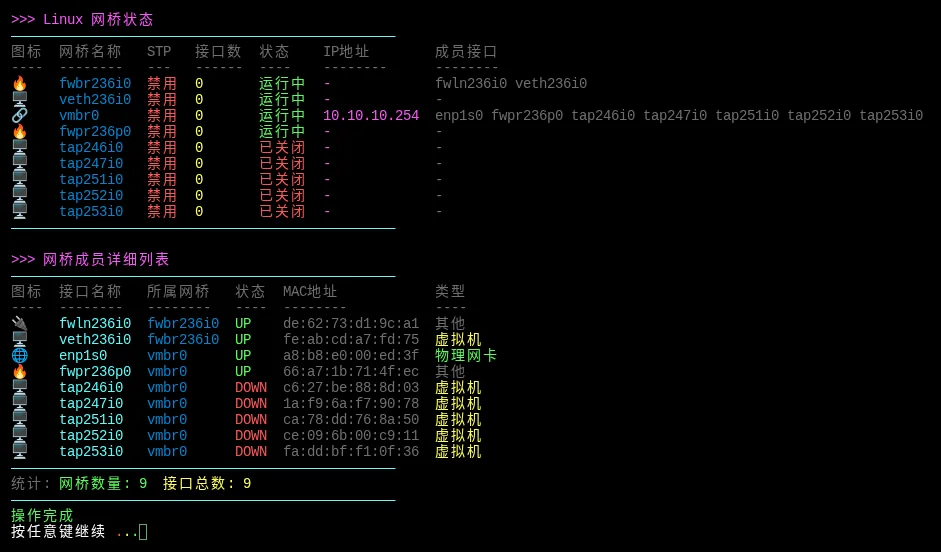
补充说明
该脚本用于查看 Linux 网桥(Bridge)状态及成员接口信息,基于 brctl、ip 和 /sys/class/net 实现,适合 PVE 节点上管理虚拟网桥的场景。
功能特点
- 网桥总览:展示所有网桥的名称、STP 状态、接口数、运行状态和 IP 地址
- 成员清单:详细列出每个网桥的成员接口及其 MAC 地址和类型
- 接口类型图标:🔗 网桥 / 🌐 物理网卡 / 🖥️ 虚拟机接口 / 🔥 防火墙接口 / 📡 VLAN
- 状态颜色标识:运行中(绿色)/ 已关闭(红色)
- 双模式查看:默认详细模式,
-s简化模式 - 统计信息:显示网桥数量和接口总数
输出说明
详细模式输出包含两部分:
| 部分 | 字段 | 说明 |
|---|---|---|
| 网桥总览 | 图标 / 网桥名称 / STP / 接口数 / 状态 / IP地址 / 成员接口 | 所有网桥概要 |
| 成员详情 | 图标 / 接口名称 / 所属网桥 / 状态 / MAC地址 / 类型 | 每个网桥的端口列表 |
参数示例
# 详细模式(默认)
bash pve_bridge_list.sh

# 简化模式
bash pve_bridge_list.sh -s

# 查看帮助
bash pve_bridge_list.sh -h
注意事项
- 需要 root 权限执行
- 依赖
bridge-utils(brctl命令),未安装时会提示安装 - 适用于任何 Linux 系统,不限于 PVE,但 PVE 虚拟机环境接口(tap/veth)会特殊标识
脚本源码
#!/bin/bash

list_color_init() {
    export gl_hui=$'\033[38;5;59m'
    export gl_hong=$'\033[38;5;9m'
    export gl_lv=$'\033[38;5;10m'
    export gl_huang=$'\033[38;5;11m'
    export gl_lan=$'\033[38;5;32m'
    export gl_bai=$'\033[38;5;15m'
    export gl_zi=$'\033[38;5;13m'
    export gl_bufan=$'\033[38;5;14m'
    export reset=$'\033[0m'
}
list_color_init

log_info() { echo -e "${gl_lan}[信息]${gl_bai} $*"; }
log_ok() { echo -e "${gl_lv}[成功]${gl_bai} $*"; }
log_warn() { echo -e "${gl_huang}[警告]${gl_bai} $*"; }
log_error() { echo -e "${gl_hong}[错误]${gl_bai} $*" >&2; }

break_end() {
    echo -e "${gl_lv}操作完成${gl_bai}"
    echo -e "${gl_bai}按任意键继续 ${gl_hong}.${gl_huang}.${gl_lv}.${gl_bai}\c"
    read -r -n 1 -s -r -p ""
    echo ""
    clear
}

column_if_available() {
    if command -v column &> /dev/null; then
        column -t -s $'\t'
    else
        cat
    fi
}

root_use() {
    clear
    if [ "$EUID" -ne 0 ]; then
        echo -e "\n${gl_zi}>>> ROOT登录检查 ${gl_hong}.${gl_huang}.${gl_lv}.${gl_bai}"
        echo -e "${gl_bufan}————————————————————————————————————————————————${gl_bai}"
        echo -e "${gl_huang}提示: ${gl_bai}该功能需要root用户才能运行!"
        echo -e "${gl_bufan}————————————————————————————————————————————————${gl_bai}"
        break_end
        mobufan
        return 1
    fi
    return 0
}

get_interface_icon() {
    local interface=$1

    if [[ "$interface" =~ ^(vmbr|bond) ]]; then
        echo "🔗"
    elif [[ "$interface" =~ ^(en|eth) ]]; then
        echo "🌐"
    elif [[ "$interface" =~ ^(tap|veth) ]]; then
        echo "🖥️"
    elif [[ "$interface" =~ ^(fwbr|fwpr) ]]; then
        echo "🔥"
    elif [[ "$interface" =~ ^(vlan) ]]; then
        echo "📡"
    else
        echo "🔌"
    fi
}

get_bridge_ports() {
    local bridge=$1
    local ports=""

    if [ -d "/sys/class/net/${bridge}/brif" ]; then
        ports=$(ls "/sys/class/net/${bridge}/brif" 2>/dev/null | tr '\n' ' ')
    fi

    echo "$ports"
}

show_bridge_status() {

    root_use

    clear

    if ! command -v brctl &> /dev/null; then
        echo -e ""
        echo -e "${gl_zi}>>> Linux 网桥状态${gl_bai}"
        echo -e "${gl_bufan}————————————————————————————————————————————————${gl_bai}"
        log_error "未检测到 bridge-utils,请安装: apt install bridge-utils"
        echo -e "${gl_bufan}————————————————————————————————————————————————${gl_bai}"
        break_end
        return 1
    fi

    echo -e "${gl_zi}>>> Linux 网桥状态${reset}"
    echo -e "${gl_bufan}————————————————————————————————————————————————${reset}"

    {
        printf "%s%s\t%s\t%s\t%s\t%s\t%s\t%s%s\n" \
            "$gl_hui" "图标" "网桥名称" "STP" "接口数" "状态" "IP地址" "成员接口" "$reset"
        printf "%s%s\t%s\t%s\t%s\t%s\t%s\t%s%s\n" \
            "$gl_hui" "----" "--------" "---" "------" "----" "--------" "--------" "$reset"

        brctl show 2>/dev/null | tail -n +2 | while read -r line; do
            [ -z "$line" ] && continue

            bridge=$(echo "$line" | awk '{print $1}')
            [ "$bridge" = "bridge" ] && continue

            stp=$(echo "$line" | awk '{print $2}')
            [ -z "$stp" ] && stp="no"

            ifaces=$(echo "$line" | awk '{print $4}')
            [[ ! "$ifaces" =~ ^[0-9]+$ ]] && ifaces="0"

            if ip link show "$bridge" 2>/dev/null | grep -q "state UP"; then
                status_text="运行中"
                status_color="$gl_lv"
            else
                status_text="已关闭"
                status_color="$gl_hong"
            fi

            ip_addr=$(ip addr show "$bridge" 2>/dev/null | grep -oP '(?<=inet\s)\d+(\.\d+){3}' | head -1)
            [ -z "$ip_addr" ] && ip_addr="-"

            ports=$(get_bridge_ports "$bridge")
            [ -z "$ports" ] && ports="-"

            icon=$(get_interface_icon "$bridge")

            if [ "$stp" = "yes" ]; then
                stp_color="$gl_lv"
                stp_text="启用"
            else
                stp_color="$gl_hong"
                stp_text="禁用"
            fi

            echo -e "${gl_bufan}${icon}${reset}\t${gl_lan}${bridge}${reset}\t${stp_color}${stp_text}${reset}\t${gl_huang}${ifaces}${reset}\t${status_color}${status_text}${reset}\t${gl_zi}${ip_addr}${reset}\t${gl_hui}${ports}${reset}"
        done
    } | column_if_available

    echo -e "${gl_bufan}————————————————————————————————————————————————${reset}"

    echo -e "\n${gl_zi}>>> 网桥成员详细列表${reset}"
    echo -e "${gl_bufan}————————————————————————————————————————————————${gl_bai}"

    {
        printf "%s%s\t%s\t%s\t%s\t%s\t%s%s\n" \
            "$gl_hui" "图标" "接口名称" "所属网桥" "状态" "MAC地址" "类型" "$reset"
        printf "%s%s\t%s\t%s\t%s\t%s\t%s%s\n" \
            "$gl_hui" "----" "--------" "--------" "----" "--------" "----" "$reset"

        brctl show 2>/dev/null | tail -n +2 | while read -r line; do
            bridge=$(echo "$line" | awk '{print $1}')
            [ "$bridge" = "bridge" ] && continue

            if [ -d "/sys/class/net/${bridge}/brif" ]; then
                for port in /sys/class/net/${bridge}/brif/*; do
                    if [ -e "$port" ]; then
                        port_name=$(basename "$port")

                        if ip link show "$port_name" 2>/dev/null | grep -q "state UP"; then
                            port_status_text="UP"
                            port_status_color="$gl_lv"
                        else
                            port_status_text="DOWN"
                            port_status_color="$gl_hong"
                        fi

                        mac=$(cat "/sys/class/net/${port_name}/address" 2>/dev/null)
                        [ -z "$mac" ] && mac="-"

                        icon=$(get_interface_icon "$port_name")
                        if [[ "$port_name" =~ ^(tap|veth) ]]; then
                            type="虚拟机"
                        elif [[ "$port_name" =~ ^(en|eth) ]]; then
                            type="物理网卡"
                        elif [[ "$port_name" =~ ^(vmbr) ]]; then
                            type="虚拟网桥"
                        else
                            type="其他"
                        fi

                        echo -e "${gl_bufan}${icon}${reset}\t${gl_bufan}${port_name}${reset}\t${gl_lan}${bridge}${reset}\t${port_status_color}${port_status_text}${reset}\t${gl_hui}${mac}${reset}\t${gl_hui}${type}${reset}"
                    fi
                done
            fi
        done
    } | column_if_available

    echo -e "${gl_bufan}————————————————————————————————————————————————${gl_bai}"

    local bridge_count=0
    local total_ports=0

    bridge_count=$(brctl show 2>/dev/null | tail -n +2 | grep -v "^bridge" | wc -l)

    for bridge in $(brctl show 2>/dev/null | tail -n +2 | awk '{print $1}'); do
        [ "$bridge" = "bridge" ] && continue
        port_count=$(ls "/sys/class/net/${bridge}/brif" 2>/dev/null | wc -l)
        total_ports=$((total_ports + port_count))
    done

    echo -e "${gl_hui}统计: ${gl_lv}网桥数量: ${bridge_count}${reset}  ${gl_huang}接口总数: ${total_ports}${reset}"

    echo -e "${gl_bufan}————————————————————————————————————————————————${reset}"
    break_end
}

show_bridge_simple() {
    clear
    echo -e "${gl_zi}>>> Linux 网桥状态 (简化)${reset}"
    echo -e "${gl_bufan}————————————————————————————————————————————————${gl_bai}"

    {
        printf "%s%s\t%s\t%s\t%s%s\n" \
            "$gl_hui" "网桥名称" "STP" "接口数" "成员接口" "$reset"
        printf "%s%s\t%s\t%s\t%s%s\n" \
            "$gl_hui" "--------" "---" "------" "--------" "$reset"

        brctl show 2>/dev/null | tail -n +2 | while read -r line; do
            bridge=$(echo "$line" | awk '{print $1}')
            [ "$bridge" = "bridge" ] && continue

            stp=$(echo "$line" | awk '{print $2}')
            [ -z "$stp" ] && stp="no"

            ifaces=$(echo "$line" | awk '{print $4}')
            [[ ! "$ifaces" =~ ^[0-9]+$ ]] && ifaces="0"

            ports=$(get_bridge_ports "$bridge")
            [ -z "$ports" ] && ports="-"

            echo -e "${gl_lan}${bridge}${reset}\t${gl_hui}${stp}${reset}\t${gl_huang}${ifaces}${reset}\t${gl_bufan}${ports}${reset}"
        done
    } | column_if_available

    echo -e "${gl_bufan}————————————————————————————————————————————————${gl_bai}"
    break_end
}

show_help() {
    echo -e "${gl_zi}Linux 网桥状态查看工具${reset}"
    echo -e "${gl_bufan}————————————————————————————————————————————————${reset}"
    echo -e "用法: $0 [选项]"
    echo -e ""
    echo -e "选项:"
    echo -e "  ${gl_lv}-h, --help${reset}      显示此帮助信息"
    echo -e "  ${gl_lv}-s, --simple${reset}    简化模式(不显示详细接口)"
    echo -e "  ${gl_lv}-d, --details${reset}   详细模式(默认)"
    echo -e ""
    echo -e "示例:"
    echo -e "  $0              ${gl_hui}# 显示详细网桥状态${reset}"
    echo -e "  $0 -s           ${gl_hui}# 显示简化网桥状态${reset}"
}

main() {
    case "$1" in
        -h|--help)
            show_help
            ;;
        -s|--simple)
            show_bridge_simple
            ;;
        -d|--details|"")
            show_bridge_status
            ;;
        *)
            echo -e "${gl_hong}未知选项: $1${reset}"
            show_help
            ;;
    esac
}

main "$@"
创建本地脚本
new_script="new_test.sh"

cat > "$new_script" << 'EOF'
#!/bin/bash

# 粘贴脚本源码

EOF

chmod +x "$new_script" && ./"$new_script" && rm -f "$new_script"