pve_storage_list
PVE 存储内容列表美化工具
一键脚本
bash <(curl -sL gitee.com/meimolihan/linux-command_sh/raw/master/pve_storage_list.sh)
效果预览
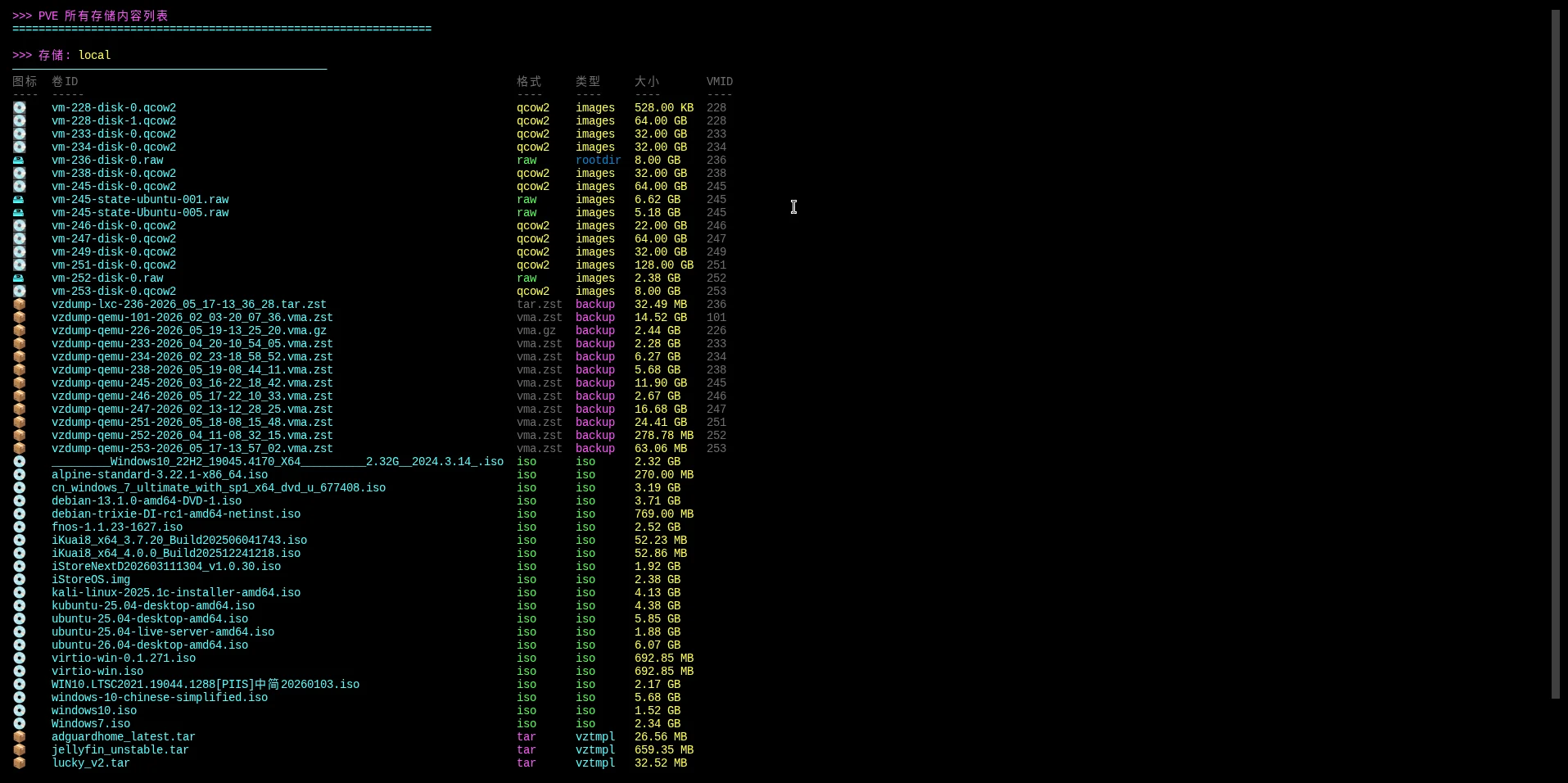
补充说明
该脚本用于在 Proxmox VE(PVE)平台上查看存储中的文件内容,基于 pvesm list 和 pvesm status 命令实现,支持按存储查看磁盘镜像、ISO 镜像、备份文件、模板文件等,适合管理 PVE 存储文件的场景。
功能特点
- 存储内容一览:展示指定存储中所有文件的卷 ID、格式、类型、大小、所属 VMID
- 文件类型图标:💿 ISO / 💽 qcow2 / 📦 备份 / 📋 模板 / 🗄️ rootdir / 📄 其他
- 颜色标识:不同类型和格式使用不同颜色区分
- 存储统计:磁盘镜像、ISO、备份、模板数量及总大小汇总
- 切换查看:多个存储时按任意键逐个切换浏览
- 存储列表:
-l参数列出所有可用存储的名称、类型、状态、容量
输出说明
详细模式输出包含以下字段:
| 字段 | 说明 |
|---|---|
| 图标 | 文件类型图标(💿 💽 📦 等) |
| 卷 ID | 文件名称(basename) |
| 格式 | qcow2 / raw / iso / tar / zst 等 |
| 类型 | images / iso / backup / vztmpl / rootdir |
| 大小 | 格式化后的文件大小 |
| VMID | 所属虚拟机/容器 ID |
| 统计 | 各类文件数量及总大小 |
参数示例
# 逐个查看所有活跃存储内容(默认)
bash pve_storage_list.sh

# 查看指定存储内容
bash pve_storage_list.sh local

# 列出所有可用存储(不展示文件)
bash pve_storage_list.sh -l

# 查看帮助
bash pve_storage_list.sh -h
注意事项
- 需要在 PVE 节点上以 root 权限执行
- 依赖
pvesm命令,仅 PVE 环境可用 - 按任意键逐个切换存储浏览,最后显示统计信息
脚本源码
#!/bin/bash

list_color_init() {
    export gl_hui=$'\033[38;5;59m'
    export gl_hong=$'\033[38;5;9m'
    export gl_lv=$'\033[38;5;10m'
    export gl_huang=$'\033[38;5;11m'
    export gl_lan=$'\033[38;5;32m'
    export gl_bai=$'\033[38;5;15m'
    export gl_zi=$'\033[38;5;13m'
    export gl_bufan=$'\033[38;5;14m'
    export reset=$'\033[0m'
}
list_color_init

log_info() { echo -e "${gl_lan}[信息]${gl_bai} $*"; }
log_ok() { echo -e "${gl_lv}[成功]${gl_bai} $*"; }
log_warn() { echo -e "${gl_huang}[警告]${gl_bai} $*"; }
log_error() { echo -e "${gl_hong}[错误]${gl_bai} $*" >&2; }

break_end() {
    echo -e "${gl_lv}操作完成${gl_bai}"
    echo -e "${gl_bai}按任意键继续 ${gl_hong}.${gl_huang}.${gl_lv}.${gl_bai}\c"
    read -r -n 1 -s -r -p ""
    echo ""
    clear
}

column_if_available() {
    if command -v column &> /dev/null; then
        column -t -s $'\t'
    else
        cat
    fi
}

format_size() {
    local size=$1
    if [[ ! "$size" =~ ^[0-9]+$ ]]; then
        echo "-"
        return
    fi

    if [ $size -ge 1073741824 ]; then
        echo "$(awk "BEGIN {printf \"%.2f\", $size/1073741824}") GB"
    elif [ $size -ge 1048576 ]; then
        echo "$(awk "BEGIN {printf \"%.2f\", $size/1048576}") MB"
    elif [ $size -ge 1024 ]; then
        echo "$(awk "BEGIN {printf \"%.2f\", $size/1024}") KB"
    else
        echo "${size} B"
    fi
}

get_file_icon() {
    local volid=$1
    local format=$2
    local type=$3

    if [[ "$volid" =~ \.iso$ ]] || [ "$type" = "iso" ]; then
        echo "💿"
    elif [[ "$volid" =~ \.qcow2$ ]] || [ "$format" = "qcow2" ]; then
        echo "💽"
    elif [[ "$volid" =~ \.raw$ ]] || [ "$format" = "raw" ]; then
        echo "🖴"
    elif [[ "$volid" =~ \.(tar|gz|zst)$ ]] || [ "$type" = "backup" ]; then
        echo "📦"
    elif [ "$type" = "vztmpl" ]; then
        echo "📋"
    elif [ "$type" = "rootdir" ]; then
        echo "🗄️"
    else
        echo "📄"
    fi
}

show_storage_by_list() {
    local storage_name="$1"

    echo -e "${gl_zi}>>> 存储: ${gl_huang}${storage_name}${reset}"
    echo -e "${gl_bufan}————————————————————————————————————————————————${gl_bai}"

    {
        printf "%s%s\t%s\t%s\t%s\t%s\t%s%s\n" \
            "$gl_hui" "图标" "卷ID" "格式" "类型" "大小" "VMID" "$reset"
        printf "%s%s\t%s\t%s\t%s\t%s\t%s%s\n" \
            "$gl_hui" "----" "-----" "----" "----" "----" "----" "$reset"

        pvesm list "$storage_name" 2>/dev/null | tail -n +2 | while read -r line; do
            volid=$(echo "$line" | awk '{print $1}')
            format=$(echo "$line" | awk '{print $2}')
            type=$(echo "$line" | awk '{print $3}')
            size=$(echo "$line" | awk '{print $4}')
            vmid=$(echo "$line" | awk '{print $5}')

            size_fmt=$(format_size "$size")
            icon=$(get_file_icon "$volid" "$format" "$type")

            case "$type" in
                images)  type_color="$gl_huang" ;;
                iso)     type_color="$gl_lv" ;;
                backup)  type_color="$gl_zi" ;;
                vztmpl)  type_color="$gl_bufan" ;;
                rootdir) type_color="$gl_lan" ;;
                *)       type_color="$gl_hui" ;;
            esac

            case "$format" in
                qcow2)    format_color="$gl_huang" ;;
                raw)      format_color="$gl_lv" ;;
                iso)      format_color="$gl_lv" ;;
                tar|zst|gz) format_color="$gl_zi" ;;
                *)        format_color="$gl_hui" ;;
            esac

            short_name=$(basename "$volid")

            echo -e "${gl_bufan}${icon}${reset}\t${gl_bufan}${short_name}${reset}\t${format_color}${format}${reset}\t${type_color}${type}${reset}\t${gl_huang}${size_fmt}${reset}\t${gl_hui}${vmid}${reset}"
        done
    } | column_if_available

    echo -e "${gl_bufan}————————————————————————————————————————————————${gl_bai}"

    local total_size=0
    local image_count=0
    local iso_count=0
    local backup_count=0
    local template_count=0

    while read -r line; do
        size=$(echo "$line" | awk '{print $4}')
        type=$(echo "$line" | awk '{print $3}')

        if [[ "$size" =~ ^[0-9]+$ ]]; then
            total_size=$((total_size + size))
        fi

        case "$type" in
            images) image_count=$((image_count + 1));;
            iso) iso_count=$((iso_count + 1));;
            backup) backup_count=$((backup_count + 1));;
            vztmpl) template_count=$((template_count + 1));;
        esac
    done < <(pvesm list "$storage_name" 2>/dev/null | tail -n +2)

    total_size_fmt=$(format_size "$total_size")

    echo -e "${gl_hui}统计: ${gl_huang}磁盘镜像: ${image_count}${reset}  ${gl_lv}ISO镜像: ${iso_count}${reset}  ${gl_zi}备份: ${backup_count}${reset}  ${gl_bufan}模板: ${template_count}${reset}  ${gl_lan}总大小: ${total_size_fmt}${reset}"
}

show_all_storages() {
    clear
    echo -e "${gl_zi}>>> PVE 所有存储内容列表${reset}"
    echo -e "${gl_bufan}================================================================${reset}"

    local storages=()
    while read -r line; do
        storage=$(echo "$line" | awk '{print $1}')
        status=$(echo "$line" | awk '{print $3}')
        if [ "$status" = "active" ]; then
            storages+=("$storage")
        fi
    done < <(pvesm status 2>/dev/null | tail -n +2)

    if [ ${#storages[@]} -eq 0 ]; then
        log_error "未找到任何活跃存储"
        break_end
        return 1
    fi

    local count=0
    for storage in "${storages[@]}"; do
        ((count++))
        echo ""
        show_storage_by_list "$storage"
        if [ $count -lt ${#storages[@]} ]; then
            echo -e "${gl_hui}按任意键继续查看下一个存储...${reset}"
            read -r -n 1 -s -r -p ""
            echo ""
            clear
        fi
    done

    echo -e "${gl_bufan}================================================================${reset}"
    break_end
}

show_help() {
    echo -e "${gl_zi}PVE 存储内容查看工具${reset}"
    echo -e "${gl_bufan}————————————————————————————————————————————————${reset}"
    echo -e "用法: $0 [选项] [存储名称]"
    echo -e ""
    echo -e "选项:"
    echo -e "  ${gl_lv}-h, --help${reset}      显示此帮助信息"
    echo -e "  ${gl_lv}-l, --list${reset}      列出所有可用存储"
    echo -e "  ${gl_lv}-a, --all${reset}      显示所有存储内容(默认)"
    echo -e ""
    echo -e "示例:"
    echo -e "  $0              ${gl_hui}# 显示所有存储内容${reset}"
    echo -e "  $0 local        ${gl_hui}# 显示 local 存储内容${reset}"
    echo -e "  $0 -l           ${gl_hui}# 列出所有存储${reset}"
}

list_storages() {
    clear

    if ! command -v qm &> /dev/null; then
	    echo -e ""
	    echo -e "${gl_huang}>>> PVE 可用存储列表${gl_bai}"
	    echo -e "${gl_bufan}————————————————————————————————————————————————${gl_bai}"
	    log_error "未检测到Proxmox VE环境,请确保脚本在PVE节点上运行"
	    echo -e "${gl_bufan}————————————————————————————————————————————————${gl_bai}"
	    break_end
	    return 1
    fi

    echo -e "${gl_zi}>>> PVE 可用存储列表${reset}"
    echo -e "${gl_bufan}————————————————————————————————————————————————${gl_bai}"

    pvesm status 2>/dev/null | tail -n +2 | while read -r line; do
        storage=$(echo "$line" | awk '{print $1}')
        type=$(echo "$line" | awk '{print $2}')
        status=$(echo "$line" | awk '{print $3}')
        total=$(echo "$line" | awk '{print $4}')
        used=$(echo "$line" | awk '{print $5}')

        if [ "$status" = "active" ]; then
            status_color="$gl_lv"
            status_text="✓ 运行中"
        else
            status_color="$gl_hong"
            status_text="✗ 离线"
        fi

        total_fmt=$(format_size "$total")
        used_fmt=$(format_size "$used")

        echo -e "  ${gl_bufan}${storage}${reset} (${gl_hui}${type}${reset}) ${status_color}${status_text}${reset}"
        echo -e "    总容量: ${gl_huang}${total_fmt}${reset}  已使用: ${gl_zi}${used_fmt}${reset}"
        echo ""
    done

    echo -e "${gl_bufan}————————————————————————————————————————————————${gl_bai}"
    break_end
}

main() {
    if ! command -v pvesm &> /dev/null; then
        echo -e ""
        echo -e "${gl_zi}>>> PVE 存储内容查看器${gl_bai}"
        echo -e "${gl_bufan}————————————————————————————————————————————————${gl_bai}"
        log_error "未检测到Proxmox VE环境,请确保脚本在PVE节点上运行"
        echo -e "${gl_bufan}————————————————————————————————————————————————${gl_bai}"
        break_end
        return 1
    fi

    case "$1" in
        -h|--help)
            show_help
            ;;
        -l|--list)
            list_storages
            ;;
        -a|--all)
            show_all_storages
            ;;
        "")
            show_all_storages
            ;;
        *)
            show_storage_by_list "$1"
            break_end
            ;;
    esac
}

main "$@"
创建本地脚本
new_script="new_test.sh"

cat > "$new_script" << 'EOF'
#!/bin/bash

# 粘贴脚本源码

EOF

chmod +x "$new_script" && ./"$new_script" && rm -f "$new_script"