linux_uninstall
Linux 卸载工具 - 全平台自动识别包管理器
一键脚本
bash <(curl -sL gitee.com/meimolihan/linux-command_sh/raw/master/linux_uninstall.sh) wget
| 模式 | 命令 | 说明 |
|---|---|---|
| 交互模式 | ./脚本名.sh |
交互式输入软件包名称 |
| 传参模式 | ./脚本名.sh 软件包1 软件包2 ... |
直接传参卸载指定软件包 |
效果预览
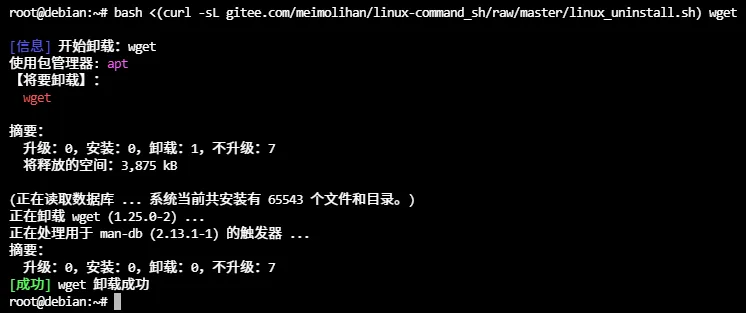
补充说明
功能描述
全平台通用的自动卸载脚本,自动识别系统包管理器,仅卸载已安装的软件包,未安装的则直接跳过,适用于批量清理软件的场景。
功能特点
- 支持7种包管理器:opkg、dnf、yum、apt、apk、pacman、zypper、pkg
- 智能检测软件是否已安装,未安装则跳过不报错
- 支持同时卸载多个软件包(空格分隔)
- 卸载后自动清理依赖包(apt会自动运行autoremove)
- 支持命令行传参模式,方便脚本调用
注意事项
- 需要root权限或sudo权限才能卸载系统软件包
- 命令行使用方式:
./脚本名.sh 软件包1 软件包2 ... - 对于7zip,脚本会自动转换为p7zip进行卸载(OpenWrt/opkg系统)
- 卸载操作不可逆,建议卸载前确认软件包名称是否正确
脚本源码
#!/bin/bash
set -uo pipefail

gl_hui='\e[37m'
gl_hong='\033[31m'
gl_lv='\033[32m'
gl_huang='\033[33m'
gl_lan='\033[34m'
gl_zi='\033[35m'
gl_bufan='\033[96m'
gl_bai='\033[97m'

log_info()  { echo -e "${gl_lan}[信息]${gl_bai} $*"; }
log_ok()    { echo -e "${gl_lv}[成功]${gl_bai} $*"; }
log_warn()  { echo -e "${gl_huang}[警告]${gl_bai} $*"; }
log_error() { echo -e "${gl_hong}[错误]${gl_bai} $*" >&2; }

uninstall_packages() {
    [[ $# -eq 0 ]] && {
        log_error "未提供软件包参数!"
        log_info "使用方法: $0 软件包1 软件包2 软件包3 ${gl_hong}.${gl_huang}.${gl_lv}.${gl_bai}"
        log_info "示例: $0 git curl wget"
        return 1
    }

    local pkg mgr installed
    for pkg in "$@"; do
        installed=false

        if command -v "$pkg" &>/dev/null; then
            installed=true
        fi

        if [[ "$pkg" == "7zip" || "$pkg" == "7z" ]]; then
            if command -v 7z &>/dev/null; then
                installed=true
            fi
        fi

        if [[ "$installed" == false ]]; then
            if command -v opkg &>/dev/null; then
                opkg list-installed | grep -q "^${pkg} " && installed=true
            elif command -v dpkg-query &>/dev/null; then
                dpkg-query -W -f='${Status}' "$pkg" 2>/dev/null | grep -q "install ok installed" && installed=true
            elif command -v rpm &>/dev/null; then
                rpm -q "$pkg" &>/dev/null && installed=true
            elif command -v apk &>/dev/null; then
                apk info "$pkg" 2>/dev/null | grep -q "^installed" && installed=true
            elif command -v pacman &>/dev/null; then
                pacman -Qi "$pkg" &>/dev/null && installed=true
            fi
        fi

        if [[ "$installed" == false ]]; then
            echo -e "${gl_huang}${pkg}${gl_bai} ${gl_hui}未安装,无需卸载${gl_bai}"
            continue
        fi

        echo -e ""
        log_info "开始卸载:${pkg}"

        local uninstall_success=false

        for mgr in opkg dnf yum apt apk pacman zypper pkg; do
            if ! command -v "$mgr" &>/dev/null; then
                continue
            fi

            case $mgr in
            opkg)
                echo -e "${gl_bai}使用包管理器: ${gl_zi}opkg${gl_bai}"
                [[ "$pkg" == "7zip" || "$pkg" == "7z" ]] && pkg="p7zip"
                opkg remove "$pkg" -n && uninstall_success=true
                ;;
            dnf)
                echo -e "${gl_bai}使用包管理器: ${gl_zi}dnf${gl_bai}"
                dnf remove -y "$pkg" && uninstall_success=true
                ;;
            yum)
                echo -e "${gl_bai}使用包管理器: ${gl_zi}yum${gl_bai}"
                yum remove -y "$pkg" && uninstall_success=true
                ;;
            apt)
                echo -e "${gl_bai}使用包管理器: ${gl_zi}apt${gl_bai}"
                apt remove -y "$pkg" && apt autoremove -y && uninstall_success=true
                ;;
            apk)
                echo -e "${gl_bai}使用包管理器: ${gl_zi}apk${gl_bai}"
                apk del "$pkg" && uninstall_success=true
                ;;
            pacman)
                echo -e "${gl_bai}使用包管理器: ${gl_zi}pacman${gl_bai}"
                pacman -Rns --noconfirm "$pkg" && uninstall_success=true
                ;;
            zypper)
                echo -e "${gl_bai}使用包管理器: ${gl_zi}zypper${gl_bai}"
                zypper remove -y "$pkg" && uninstall_success=true
                ;;
            pkg)
                echo -e "${gl_bai}使用包管理器: ${gl_zi}pkg${gl_bai}"
                pkg delete -y "$pkg" && uninstall_success=true
                ;;
            esac

            [[ "$uninstall_success" == true ]] && break
        done

        if [[ "$uninstall_success" == true ]]; then
            log_ok "${pkg} 卸载成功"
        else
            log_error "${pkg} 卸载失败"
        fi
    done
}

uninstall_packages "$@"
创建本地脚本
new_script="new_test.sh"

cat > "$new_script" << 'EOF'
#!/bin/bash

# 粘贴脚本源码

EOF

# 保留本地脚本,去掉 rm -f "$new_script"
chmod +x "$new_script" && ./"$new_script" && rm -f "$new_script"
相关命令
- linux_install
- linux_uninstall 👈 当前所在位置